The band opens
The original backing-band shot sets up the familiar groove before the lead close-up.
Same groove. Your Outstanding moment.
Tiny Desk AI Video Maker turns one clear adult portrait into an 18-second Outstanding-style video. Keep the reference cuts, band and soundtrack — change the lead, not the whole performance.
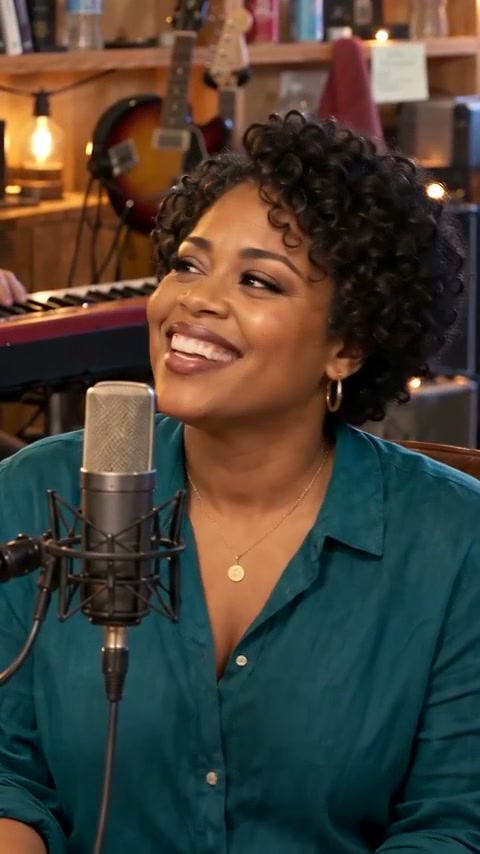 Your lead moment
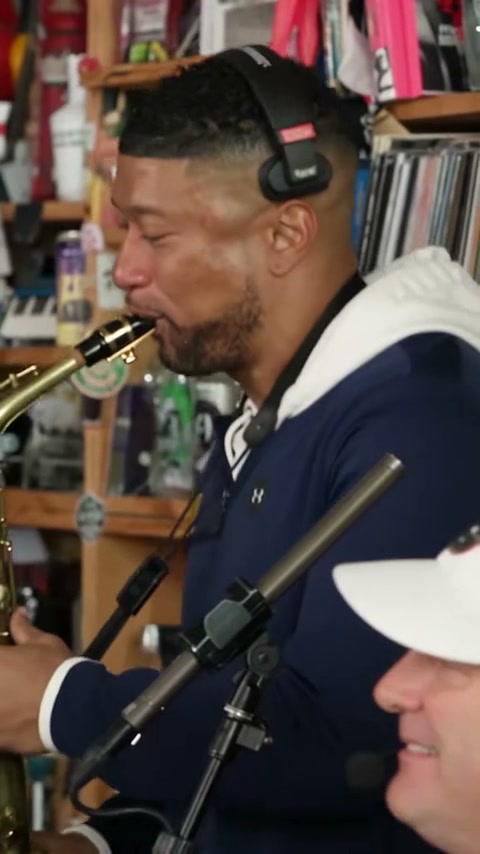 Sax & finale
one lead portrait; an outfit reference is optional
reference cuts with the original soundtrack
portrait MP4, ready for your phone
Take the lead
THE ORIGINAL OUTSTANDING EDIT
One lead portrait. Optional outfit reference. We keep the original edit simple: the familiar cuts, backing shots and soundtrack.
Photo → Confirm → Generate
Your photos stay on this device until you press Generate. That action sends them to our server and processing service.
Checking your session and studio availability…
Each edit costs 10 site credits. Confirmed generation failures return those credits once. An uncertain submission is not automatically retried or refunded.
THE COMPLETE OUTSTANDING EDIT
Watch the complete 17.67-second edit: the band opening, the replaced lead, then the original sax and band finale. These are moments from one film, not three templates.
The original backing-band shot sets up the familiar groove before the lead close-up.
The new lead takes the close-up while the edit keeps its reference timing and soundtrack.
Keep the original saxophone response and return to the band for the ending.
All three images are frames from this complete film. Only the lead is replaced; backing shots and music come from the reference. This AI remix is not an official performance or a grant of commercial rights.
Download the complete sample MP4No template maze. No technical settings. Just your photo and the original edit.
Start with one clear, front-facing adult portrait. Optionally add a waist-up photo of the same person to guide clothing and appearance.
Confirm photo permission, then generate for 10 site credits when the licensed template is available. The reference cuts and backing shots stay in place.
Follow real task status, then play and download an approximately 18-second portrait MP4 with the reference soundtrack restored.
Photos upload only when you press Generate. No automatic paid retries. Confirmed generation failures restore site credits once.
Before you choose a photo
A simple, neutral portrait gives the edit a cleaner reference. Both photos, if supplied, must show the same adult.
One adult, sharp focus, even lighting, and a natural expression. Avoid strong head tilts or closed eyes.
Skip sunglasses, hats, and masks so facial details stay visible.
An optional waist-up reference helps specify clothing. Use a simple background without microphones, instruments or distracting objects.
Use your own portrait or explicit permission from the adult pictured. Photo checks do not verify age, identity or usage rights.
The joke is in the familiar performance: the same groove, the same cuts, and an unexpected new lead taking it seriously. It is a reference-video remix, not a freshly invented concert.
We focus on one lead-only original edit first. Band, sax and final shots retain the template footage; extra casting templates are not offered as if they were already verified.
TinyDesk AI Maker is an independent project. It is not affiliated with NPR or NPR's Tiny Desk Concerts.
One-time packs, no subscription. Each edit costs 10 site credits. Choose 10, 30 or 50 credits for one, three or five videos.
10 site credits
$7.99USD / one-time
10 site credits for one approximately 18-second portrait edit with the reference soundtrack.
One-time purchase · No subscription
30 site credits
$19.99USD / one-time
30 site credits for three edits. Try different portraits without a subscription.
One-time purchase · No subscription
50 site credits
$29.99USD / one-time
50 site credits for five edits. The same focused original workflow for every video.
One-time purchase · No subscription
Prices are in USD; applicable taxes are calculated at checkout. Checkout opens the configured payment provider. Credits appear after confirmed payment, not from clicking a card. Confirmed generation failures restore site credits, not an automatic cash refund. No permanent storage entitlement is included.
Purchases are paused until the licensed template and checkout are available. You can still preview photos for free.
Photos, the original edit, credits and usage rights — the essentials.
The Outstanding trend remixes a familiar tiny-desk performance by changing its lead while keeping the reference cuts and music. This studio focuses on that single format.
Upload a clear adult portrait, optionally add a second photo of the same person, confirm permission and generate. The server edits the reference lead, restores the original backing shots and aligns the source soundtrack. There are no technical settings to choose.
Browsing and local photo previews are free. An enabled generation costs 10 site credits. Packs cost $7.99 for 10 credits, $19.99 for 30, or $29.99 for 50. Purchases stay disabled while the template or checkout is unavailable.
Provider timing varies. The studio displays actual pending, processing, completed, failed, or uncertain-submission states — never a fake percentage or a delivery-time promise. Task history remains available after a reload.
Use one front-facing adult portrait; an optional second photo should show the same person waist-up. JPEG, PNG and WebP are supported. Each image must be 512–5999 pixels per side, at most 10 MiB, and have a width/height ratio from 0.5 to 1.25. Combined size is at most 20 MiB. Avoid microphones, instruments, busy backgrounds and covered faces.
Not in this version. The original workflow changes one lead performer only. A second uploaded photo guides that same person, not a second cast member. The band and sax shots stay as supplied by the template.
A confirmed generation failure returns the charged site credits once. No automatic replacement generation is submitted. An uncertain network submission is kept pending for investigation, not declared failed or blindly refunded; check your existing task before considering another video. This is a site-credit refund policy, not an automatic cash refund.
The original edit is a portrait MP4, 480 × 854 pixels, 24 fps and approximately 18 seconds. The opening shot is omitted, matching the shorter reference format. The soundtrack is restored from the template rather than generated again.
Previews remain in your browser until you press Generate. Generation sends the selected photos to our server and a processing service. Signing in alone does not upload them. Only your signed-in account can retrieve its task results.
Use your own photo or a photo of an adult who has explicitly agreed to this use. Do not use someone else's likeness without permission, and do not present an AI-made performance as authentic footage.
Download completed MP4 files promptly. Task history is not permanent media storage, and processing-service links or server files may expire. A video pack does not include perpetual hosting.
No. TinyDesk AI Maker is independent and is not affiliated with or endorsed by NPR or Tiny Desk Concerts. AI-generated sample scenes should not be mistaken for official concert footage.
An AI edit does not grant rights to the recording, composition, reference footage or likenesses. Only a rights-cleared master can enable this template. Personal fan edits do not automatically qualify for advertising or commercial distribution; secure the relevant permissions first.
One portrait. The familiar groove. No technical settings in the way.
Open the live studioPreview locally first. Sign in and press Generate to upload and spend site credits.